email security
83 TopicsEnterprise Cybersecurity in the Age of AI: Why Legacy Security Is Failing as Attackers Move Faster
Cybersecurity has always been an asymmetric game. But with the rise of AI‑enabled attacks, that imbalance has widened dramatically. Microsoft Threat Intelligence and Microsoft Defender Security Research have publicly reported a clear shift in how attackers operate: AI is now being embedded across the entire attack lifecycle. Threat actors are using it to accelerate reconnaissance, generate highly targeted phishing at scale, automate infrastructure, and adapt their techniques in real time - reducing the time and effort required to move from initial access to impact. In recent months, Microsoft has documented AI‑enabled phishing campaigns abusing legitimate authentication mechanisms - including OAuth and device‑code flows - to compromise enterprise accounts at scale. These campaigns rely on automation, dynamic code generation, and highly personalised lures, rather than on stealing passwords or exploiting traditional vulnerabilities. Meanwhile, many large enterprises are still defending themselves with security controls designed for a very different threat model - one rooted in predictability, static signatures, and trusted perimeters. These approaches were built to stop repeatable attacks, not adversaries that continuously adapt and blend into normal business activity. The result is a dangerous gap: highly adaptive attackers versus static, legacy defences. Below are some of the most common outdated security practices still widely used by enterprises today - and why they are no longer sufficient against modern, AI‑driven threats. 1. Signature‑Based Antivirus Traditional antivirus solutions rely on known signatures and hashes, assuming malware looks the same each time it is deployed. AI has completely broken that assumption. Modern malware families now automatically mutate their code, generate new variants on execution, and adapt behaviour based on the environment they encounter. Microsoft Threat Intelligence has observed multiple actors using AI‑assisted tooling to rapidly rewrite payload components during development and testing, making each deployment look subtly different. In this model, there is no stable signature to detect. By the time a pattern exists, the attacker has already iterated past it. Signature‑based detection is not just slow - it is structurally mismatched to how modern threats operate. What to adopt instead Shift from artifact‑based detection to behavior‑based endpoint protection: EDR/XDR platforms that analyse process behaviour, memory activity, and execution chains Machine‑learning models trained on what attackers do, not what binaries look like Continuous monitoring with automated response, not one‑time blocking 2. Firewalls Many enterprises still rely on firewalls that enforce static allow/deny rules based on ports and IP addresses. That approach worked when applications were predictable and networks were clearly segmented. Today, traffic is encrypted, cloud‑based, API‑driven, and deeply intertwined with legitimate SaaS and identity services. Recent AI‑assisted phishing campaigns abusing legitimate OAuth and device‑code authentication flows illustrate this perfectly. From a network perspective, everything looks allowed: HTTPS traffic to trusted identity providers. There is no suspicious port, no malicious domain, no obvious anomaly - yet the attacker successfully hijacks the authentication process itself. What to adopt instead Move from perimeter controls to identity‑ and context‑aware network security: Application‑aware firewalls with behavioural and risk‑based inspection Integration with identity signals (user, device, location, risk score) Continuous evaluation of sessions, not one‑time allow/deny decisions In modern environments, identity is the new control plane. 3. Single‑Factor Authentication Despite years of guidance, single‑factor passwords remain common - especially for legacy applications, VPN access, and service accounts. AI‑powered credential abuse changes the economics of these attacks entirely. Threat actors now operate credential‑stuffing and phishing campaigns that adapt lures in real time, testing millions of combinations with minimal cost. In multiple Microsoft‑observed campaigns, attackers didn’t brute‑force access broadly. Instead, they used AI to identify which compromised identities were financially or operationally valuable - executives, payroll, procurement - and focused only on those accounts. What to adopt instead Replace static authentication with phishing‑resistant, risk‑based identity controls: Phishing‑resistant MFA (hardware‑backed or passkeys) Conditional access based on user behaviour, device health, and risk Continuous authentication instead of a single login event 4. VPN‑Centric Security VPNs were designed to extend the corporate network to remote users, based on the assumption that “inside” meant trustworthy. That assumption no longer holds. AI‑assisted attacks increasingly exploit VPN access post‑compromise. Once credentials are obtained, automation is used to map internal resources, identify privilege escalation paths, and move laterally - often without triggering traditional alerts. In parallel, Microsoft has observed nation‑state actors using AI to create highly convincing fake employee personas, complete with AI‑generated resumes, consistent communication styles, and synthetic media, allowing them to pass hiring and onboarding processes and gain long‑term, trusted access. In these scenarios, VPN access is not breached - it is granted. What to adopt instead Transition from network trust to Zero Trust access models: Identity‑based access to applications, not networks Least‑privilege, per‑app/user/service access instead of broad internal connectivity Continuous verification using behavioural signals In modern enterprises, access should be explicit, scoped, and continuously re‑evaluated. 5. Treating Unencrypted Data as “Low‑Risk” It is still common to find sensitive data stored unencrypted in older databases, file shares, and backups. In an AI‑driven threat landscape, data discovery is no longer manual or slow. After compromise, attackers increasingly use AI as an on‑demand analyst - summarizing directory structures, classifying stolen datasets, and prioritizing what matters most for impact or monetization. Unencrypted data dramatically lowers the cost and consequence of breach activity, turning what could have been a limited incident into a full‑scale exposure. What to adopt instead Shift from passive data storage to data‑centric security: Encryption by default, both at rest and in transit Data classification and sensitivity labeling built into platforms Access controls tied to data sensitivity, not just system location Begin preparing for post‑quantum cryptography (PQC) as part of long‑term data protection and crypto‑agility strategy 6. Intrusion Detection Systems (IDS) Built on Known Patterns Traditional IDS platforms look for known indicators of compromise - assuming attackers reuse the same tools and techniques. AI‑driven attacks deliberately avoid that assumption. Microsoft Threat Intelligence reports actors using large language models to quickly analyse publicly disclosed vulnerabilities, understand exploitation paths, and compress the time between disclosure and weaponization. This isn’t about zero‑days - it’s about speed. What once took days or weeks now takes hours. Legacy IDS platforms often fail silently in these scenarios, detecting only what they already know how to recognize. What to adopt instead Move from static detection to adaptive, correlation‑based threat detection: Graph‑based XDR platforms correlating signals across identity, endpoint, email, cloud, and network Anomaly detection that focuses on deviation from normal behaviour Automated investigation and response to match attacker speed Closing Thought: Security Is a Journey, Not a Destination AI is not a future cybersecurity problem. It is a current force multiplier for attackers - and it is exposing the limits of legacy security architectures faster than many organisations are willing to admit. A realistic security strategy starts with an uncomfortable but necessary acknowledgement: no organisation can be 100% secure. Intrusions will happen. Credentials will be compromised. Controls will be tested. The difference between a resilient enterprise and a vulnerable one is not the absence of incidents, but how effectively risk is managed when they occur. In mature organisations, this means assuming breach and designing for containment. Strong access controls limit blast radius. Least privilege and conditional access reduce what an attacker can reach. Data Loss Prevention (DLP) ensures that even when access is misused, sensitive data cannot be freely exfiltrated. Just as importantly, leaders understand the business consequences of compromise - which data matters most, which systems are critical, and which risks are acceptable versus existential. As a cybersecurity architect, I see this moment as a unique opportunity. AI adoption does not have to repeat the mistakes of earlier technology waves, where innovation moved fast and security followed years later. AI gives organisations the chance to introduce a new class of service while embedding security from day one - designing access, data boundaries, monitoring, and governance into the platform before it becomes business‑critical. When security is built in upfront, enterprises don’t just reduce risk - they gain confidence to move faster and truly leverage AI’s value. Security, especially in the age of AI, is not about preventing every intrusion. It is about controlling impact, preserving trust, and maintaining operational continuity in a world where attackers move faster than ever. In the age of AI, standing still is the same as falling behind. References: Inside an AI‑enabled device code phishing campaign | Microsoft Security Blog AI as tradecraft: How threat actors operationalize AI | Microsoft Security Blog Detecting and analyzing prompt abuse in AI tools | Microsoft Security Blog Post-Quantum Cryptography | CSRC Microsoft Digital Defense Report 2025 | Microsoft
Why External Users Can’t Open Encrypted Attachments in Certain Conditions & How to Fix It Securely
When Conditional Access policies enforce MFA across all cloud apps and include external users, encrypted attachments may require additional considerations. This post explains why. This behavior applies only in environments where all of the following are true: Microsoft Purview encryption is used for emails and attachments A Conditional Access (CA) policy is configured to: Require MFA Apply to all cloud applications Include guest or external users The Situation: Email Opens, Attachment Doesn’t When an email is encrypted using: Microsoft Purview Sensitivity Labels, or Information Rights Management (IRM) Any attached Office document automatically inherits encryption. This inheritance is intentional and enforced by the service, Ensures consistent protection of sensitive content. That inheritance is mandatory and cannot be disabled. So far, so good. But here’s where things break for external recipients. The Hidden Dependency: Identity & Conditional Access Reading an encrypted email and opening an encrypted attachment are two different flows. External users can usually read encrypted emails by authenticating through: One-Time Passcode (OTP) Microsoft personal accounts Their own organization’s identity However, encrypted attachments use Microsoft Rights Management Services (RMS) — and RMS expects an identity the sender’s tenant can evaluate. If your organization has: A global Conditional Access policy Enforcing MFA for all users Applied to all cloud apps external users can get blocked even after successful email decryption. This commonly results in errors like: “This account does not exist in the sender’s tenant…” AADSTS90072: The external user account does not exist in our tenant and cannot access the Microsoft Office application. The account needs to be added as an external user in the tenant or use an alternative authentication method. When It Works (and Why It Often Doesn’t) External access to encrypted attachments works only when one of these conditions is met: The sender trusts the recipient’s tenant MFA via Cross‑Tenant Access (MFA trust) The recipient already exists as a guest account in the sender’s tenant In real-world scenarios, these conditions often fail: External recipients use consumer or non‑Entra identities Recipient domains are not predictable Guest onboarding does not scale Cross‑tenant trust is intentionally restricted In such cases, Conditional Access policies designed for internal users can affect RMS evaluation for external users. So what’s the alternative? The Practical, Secure Alternative When the two standard access conditions (cross‑tenant trust or guest presence) cannot be met , you can refine Conditional Access evaluation without weakening encryption. The goal is not to remove MFA, but to ensure it is applied appropriately based on identity type and access path. In this scenario: MFA remains enforced for all internal users, including access to Microsoft Rights Management Services (RMS) MFA remains enforced for external users across cloud applications other than RMS The Key Idea Let encryption stay strong, but stop blocking external RMS authentication. This is achieved by: Keeping the existing Conditional Access policy that enforces MFA for all internal users across all cloud applications, including RMS Excluding guest and external users from that internal‑only policy Deploying a separate Conditional Access policy scoped to guest and external users to: Continue enforcing MFA for external users where supported Explicitly exclude Microsoft Rights Management Services (RMS) from evaluation RMS can be excluded from the external‑user policy by specifying the following application (client) ID: RMS App ID: 00000012-0000-0000-c000-000000000000 Why This Is Still Secure This approach: ✅ Keeps email and attachment encryption fully intact ✅ Internal security posture is unchanged ✅ External users remain protected by MFA where applicable ✅ Allows external users to authenticate using supported methods ✅ Avoids over-trusting external tenants ✅ Scales for large, unpredictable recipient sets Final Takeaway Encrypted attachment access is governed by identity recognition and policy design, not by email encryption alone. By aligning Conditional Access with how encrypted content is evaluated, organizations can enable secure external collaboration while maintaining strong protection standardsAuthorization and Governance for AI Agents: Runtime Authorization Beyond Identity at Scale
Designing Authorization‑Aware AI Agents at Scale Enforcing Runtime RBAC + ABAC with Approval Injection (JIT) Microsoft Entra Agent Identity enables organizations to govern and manage AI agent identities in Copilot Studio, improving visibility and identity-level control. However, as enterprises deploy multiple autonomous AI agents, identity and OAuth permissions alone cannot answer a more critical question: “Should this action be executed now, by this agent, for this user, under the current business and regulatory context?” This post introduces a reusable Authorization Fabric—combining a Policy Enforcement Point (PEP) and Policy Decision Point (PDP)—implemented as a Microsoft Entra‑protected endpoint using Azure Functions/App Service authentication. Every AI agent (Copilot Studio or AI Foundry/Semantic Kernel) calls this fabric before tool execution, receiving a deterministic runtime decision: ALLOW / DENY / REQUIRE_APPROVAL / MASK Who this is for Anyone building AI agents (Copilot Studio, AI Foundry/Semantic Kernel) that call tools, workflows, or APIs Organizations scaling to multiple agents and needing consistent runtime controls Teams operating in regulated or security‑sensitive environments, where decisions must be deterministic and auditable Why a V2? Identity is necessary—runtime authorization is missing Entra Agent Identity (preview) integrates Copilot Studio agents with Microsoft Entra so that newly created agents automatically get an Entra agent identity, manageable in the Entra admin center, and identity activity is logged in Entra. That solves who the agent is and improves identity governance visibility. But multi-agent deployments introduce a new risk class: Autonomous execution sprawl — many agents, operating with delegated privileges, invoking the same backends independently. OAuth and API permissions answer “can the agent call this API?” They do not answer “should the agent execute this action under business policy, compliance constraints, data boundaries, and approval thresholds?” This is where a runtime authorization decision plane becomes essential. The pattern: Microsoft Entra‑Protected Authorization Fabric (PEP + PDP) Instead of embedding RBAC logic independently inside every agent, use a shared fabric: PEP (Policy Enforcement Point): Gatekeeper invoked before any tool/action PDP (Policy Decision Point): Evaluates RBAC + ABAC + approval policies Decision output: ALLOW / DENY / REQUIRE_APPROVAL / MASK This Authorization Fabric functions as a shared enterprise control plane, decoupling authorization logic from individual agents and enforcing policies consistently across all autonomous execution paths. Architecture (POC reference architecture) Use a single runtime decision plane that sits between agents and tools. What’s important here Every agent (Copilot Studio or AI Foundry/SK) calls the Authorization Fabric API first The fabric is a protected endpoint (Microsoft Entra‑protected endpoint required) Tools (Graph/ERP/CRM/custom APIs) are invoked only after an ALLOW decision (or approval) Trust boundaries enforced by this architecture Agents never call business tools directly without a prior authorization decision The Authorization Fabric validates caller identity via Microsoft Entra Authorization decisions are centralized, consistent, and auditable Approval workflows act as a runtime “break-glass” control for high-impact actions This ensures identity, intent, and execution are independently enforced, rather than implicitly trusted. Runtime flow (Decision → Approval → Execution) Here is the runtime sequence as a simple flow (you can keep your Mermaid diagram too). ```mermaid flowchart TD START(["START"]) --> S1["[1] User Request"] S1 --> S2["[2] Agent Extracts Intent\n(action, resource, attributes)"] S2 --> S3["[3] Call /authorize\n(Entra protected)"] S3 --> S4 subgraph S4["[4] PDP Evaluation"] ABAC["ABAC: Tenant · Region · Data Sensitivity"] RBAC["RBAC: Entitlement Check"] Threshold["Approval Threshold"] ABAC --> RBAC --> Threshold end S4 --> Decision{"[5] Decision?"} Decision -->|"ALLOW"| Exec["Execute Tool / API"] Decision -->|"MASK"| Masked["Execute with Masked Data"] Decision -->|"DENY"| Block["Block Request"] Decision -->|"REQUIRE_APPROVAL"| Approve{"[6] Approval Flow"} Approve -->|"Approved"| Exec Approve -->|"Rejected"| Block Exec --> Audit["[7] Audit & Telemetry"] Masked --> Audit Block --> Audit Audit --> ENDNODE(["END"]) style START fill:#4A90D9,stroke:#333,color:#fff style ENDNODE fill:#4A90D9,stroke:#333,color:#fff style S1 fill:#5B5FC7,stroke:#333,color:#fff style S2 fill:#5B5FC7,stroke:#333,color:#fff style S3 fill:#E8A838,stroke:#333,color:#fff style S4 fill:#FFF3E0,stroke:#E8A838,stroke-width:2px style ABAC fill:#FCE4B2,stroke:#999 style RBAC fill:#FCE4B2,stroke:#999 style Threshold fill:#FCE4B2,stroke:#999 style Decision fill:#fff,stroke:#333 style Exec fill:#2ECC71,stroke:#333,color:#fff style Masked fill:#27AE60,stroke:#333,color:#fff style Block fill:#C0392B,stroke:#333,color:#fff style Approve fill:#F39C12,stroke:#333,color:#fff style Audit fill:#3498DB,stroke:#333,color:#fff ``` Design principle: No tool execution occurs until the Authorization Fabric returns ALLOW or REQUIRE_APPROVAL is satisfied via an approval workflow. Where Power Automate fits (important for readers) In most Copilot Studio implementations, Agents calls Power Automate (agent flows), is the practical integration layer that calls enterprise services and APIs. Copilot Studio supports “agent flows” as a way to extend agent capabilities with low-code workflows. For this pattern, Power Automate typically: acquires/uses the right identity context for the call (depending on your tenant setup), and calls the /authorize endpoint of the Authorization Fabric, returns the decision payload to the agent for branching. Copilot Studio also supports calling REST endpoints directly using the HTTP Request node, including passing headers such as Authorization: Bearer <token>. Protected endpoint only: Securing the Authorization Fabric with Microsoft Entra For this V2 pattern, the Authorization Fabric must be protected using Microsoft Entra‑protected endpoint on Azure Functions/App Service (built‑in auth). Microsoft Learn provides the configuration guidance for enabling Microsoft Entra as the authentication provider for Azure App Service / Azure Functions. Step 1 — Create the Authorization Fabric API (Azure Function) Expose an authorization endpoint: HTTP Step 2 — Enable Microsoft Entra‑protected endpoint on the Function App In Azure Portal: Function App → Authentication Add identity provider → Microsoft Choose Workforce configuration (enterprise tenant) Set Require authentication for all requests This ensures the Authorization Fabric is not callable without a valid Entra token. Step 3 — Optional hardening (recommended) Depending on enterprise posture, layer: IP restrictions / Private endpoints APIM in front of the Function for rate limiting, request normalization, centralized logging (For a POC, keep it minimal—add hardening incrementally.) Externalizing policy (so governance scales) To make this pattern reusable across multiple agents, policies should not be hardcoded inside each agent. Instead, store policy definitions in a central policy store such as Cosmos DB (or equivalent configuration store), and have the PDP load/evaluate policies at runtime. Why this matters: Policy changes apply across all agents instantly (no agent republish) Central governance + versioning + rollback becomes possible Audit and reporting become consistent across environments (For the POC, a single JSON document per policy pack in Cosmos DB is sufficient. For production, add versioning and staged rollout.) Store one PolicyPack JSON document per environment (dev/test/prod). Include version, effectiveFrom, priority for safe rollout/rollback. Minimal decision contract (standard request / response) To keep the fabric reusable across agents, standardize the request payload. Request payload (example) Decision response (deterministic) Example scenario (1 minute to understand) Scenario: A user asks a Finance agent to create a Purchase Order for 70,000. Even if the user has API permission and the agent can technically call the ERP API, runtime policy should return: REQUIRE_APPROVAL (threshold exceeded) trigger an approval workflow execute only after approval is granted This is the difference between API access and authorized business execution. Sample Policy Model (RBAC + ABAC + Approval) This POC policy model intentionally stays simple while demonstrating both coarse and fine-grained governance. 1) Coarse‑grained RBAC (roles → actions) FinanceAnalyst CreatePO up to 50,000 ViewVendor FinanceManager CreatePO up to 100,000 and/or approve higher spend 2) Fine‑grained ABAC (conditions at runtime) ABAC evaluates context such as region, classification, tenant boundary, and risk: 3) Approval injection (Agent‑level JIT execution) For higher-risk/high-impact actions, the fabric returns REQUIRE_APPROVAL rather than hard deny (when appropriate): How policies should be evaluated (deterministic order) To ensure predictable and auditable behavior, evaluate in a deterministic order: Tenant isolation & residency (ABAC hard deny first) Classification rules (deny or mask) RBAC entitlement validation Threshold/risk evaluation Approval injection (JIT step-up) This prevents approval workflows from bypassing foundational security boundaries such as tenant isolation or data sovereignty. Copilot Studio integration (enforcing runtime authorization) Copilot Studio can call external REST APIs using the HTTP Request node, including passing headers such as Authorization: Bearer <token> and binding response schema for branching logic. Copilot Studio also supports using flows with agents (“agent flows”) to extend capabilities and orchestrate actions. Option A (Recommended): Copilot Studio → Agent Flow (Power Automate) → Authorization Fabric Why: Flows are a practical place to handle token acquisition patterns, approval orchestration, and standardized logging. Topic flow: Extract user intent + parameters Call an agent flow that: calls /authorize returns decision payload Branch in the topic: If ALLOW → proceed to tool call If REQUIRE_APPROVAL → trigger approval flow; proceed only if approved If DENY → stop and explain policy reason Important: Tool execution must never be reachable through an alternate topic path that bypasses the authorization check. Option B: Direct HTTP Request node to Authorization Fabric Use the Send HTTP request node to call the authorization endpoint and branch using the response schema. This approach is clean, but token acquisition and secure secretless authentication are often simpler when handled via a managed integration layer (flow + connector). AI Foundry / Semantic Kernel integration (tool invocation gate) For Foundry/SK agents, the integration point is before tool execution. Semantic Kernel supports Azure AI agent patterns and tool integration, making it a natural place to enforce a pre-tool authorization check. Pseudo-pattern: Agent extracts intent + context Calls Authorization Fabric Enforces decision Executes tool only when allowed (or after approval) Telemetry & audit (what Security Architects will ask for) Even the best policy engine is incomplete without audit trails. At minimum, log: agentId, userUPN, action, resource decision + reason + policyIds approval outcome (if any) correlationId for downstream tool execution Why it matters: you now have a defensible answer to: “Why did an autonomous agent execute this action?” Security signal bonus: Denials, unusual approval rates, and repeated policy mismatches can also indicate prompt injection attempts, mis-scoped agents, or governance drift. What this enables (and why it scales) With a shared Authorization Fabric: Avoid duplicating authorization logic across agents Standardize decisions across Copilot Studio + Foundry agents Update governance once (policy change) and apply everywhere Make autonomy safer without blocking productivity Closing: Identity gets you who. Runtime authorization gets you whether/when/how. Copilot Studio can automatically create Entra agent identities (preview), improving identity governance and visibility for agents. But safe autonomy requires a runtime decision plane. Securing that plane as an Entra-protected endpoint is foundational for enterprise deployments. In enterprise environments, autonomous execution without runtime authorization is equivalent to privileged access without PIM—powerful, fast, and operationally risky.Announcing public preview of custom graphs in Microsoft Sentinel
Security attacks span identities, devices, resources, and activity, making it critical to understand how these elements connect to expose real risk. In November, we shared how Sentinel graph brings these signals together into a relationship-aware view to help uncover hidden security risks. We’re excited to announce the public preview of custom graphs in Sentinel, available starting April 1 st . Custom graphs let defenders model relationships that are unique to their organization, then run graph analytics to surface blast radius, attack paths, privilege chains, chokepoints, and anomalies that are difficult to spot in tables alone. In this post, we’ll cover what custom graphs are, how they work, and how to get started so the entire team can use them. Custom graphs Security data is inherently connected: a sign-in leads to a token, a token touches a workload, a workload accesses data, and data movement triggers new activity. Graphs represent these relationships as nodes (entities) and edges (relationships), helping you answer questions like: “Who received the phishing email, who clicked, and which clicks were allowed by the proxy?” or “Show me users who exported notebooks, staged files in storage, then uploaded data to personal cloud storage- the full, three‑phase exfiltration chain through one identity.” With custom graphs, security teams can build, query, and visualize tailored security graphs using data from the Sentinel data lake and non-Microsoft sources, powered by Fabric. By uncovering hidden patterns and attack paths, graphs provide the relationship context needed to surface real risk. This context strengthens AI‑powered agent experiences, speeds investigations, clarifies blast radius, and helps teams move from noisy, disconnected alerts to confident decisions. In the words of our preview customers: “We ingested our Databricks management-plane telemetry into the Sentinel data lake and built a custom security graph. Without writing a single detection rule, the graph surfaced unusual patterns of activity and overprivileged access that we escalated for investigation. We didn't know what we were looking for, the graph surfaced the risk for us by revealing anomalous activity patterns and unusual access combinations driven by relationships, not alerts.” – SVP, Security Solutions | Financial Services organization Use cases Sentinel graph offers embedded, Microsoft managed, security graphs in Defender and Microsoft Purview experiences to help you at every stage of defense, from pre-breach to post-breach and across assets, activities, and threat intelligence. See here for more details. The new custom graph capability gives you full control to create your own graphs combining data from Microsoft sources, non-Microsoft sources, and federated sources in the Sentinel data lake. With custom graphs you can: Understand blast radius – Trace phishing campaigns, malware spread, OAuth abuse, or privilege escalation paths across identities, devices, apps, and data, without stitching together dozens of tables. Reconstruct real attack chains – Model multi-step attacker behavior (MITRE techniques, lateral movement, before/after malware) as connected sequences so investigations are complete and explainable, not a set of partial pivots. Reconstruct these chains from historical data in the Sentinel data lake. Figure 2: Drill into which specific MITRE techniques each IP is executing and in which tactic category Spot hidden risks and anomalies – Detect structural outliers like users with unusually broad access, anomalous email exfiltration, or dangerous permission combinations that are invisible in flat logs. Figure 3: OAuth consent chain – a single compromised user consented four dangerous permissions Creating custom graph Using the Sentinel VS Code extension, you can generate graphs to validate hunting hypotheses, such as understanding attack paths and blast radius of a phishing campaign, reconstructing multi‑step attack chains, and identifying structurally unusual or high‑risk behavior, making it accessible to your team and AI agents. Once persisted via a schedule job, you can access these custom graphs from the ready-to-use section in the graphs section in the Defender portal. Figure 4: Use AI-assisted vibe coding in Visual Studio Code to create tailored security graphs powered by Sentinel data lake and Fabric Graphs experience in the Microsoft Defender portal After creating your custom graphs, you can access them in the Graphs section of the Microsoft Defender portal under Sentinel. From there, you can perform interactive, graph-based investigations, for example, using a graph built for phishing analysis to quickly evaluate the impact of a recent incident, profile the attacker, and trace paths across Microsoft telemetry and third-party data. The graph experience lets you run Graph Query Language (GQL) queries, view the graph schema, visualize results, see results in a table, and interactively traverse to the next hop with a single click. Figure 5: Query, visualize, and traverse custom graphs with the new graph experience in Sentinel Billing Custom graph API usage for creating graph and querying graph is billed according to the Sentinel graph meter. Get started To use custom graphs, you’ll need Microsoft Sentinel data lake enabled in your tenant, since the lake provides the scalable, open-format foundation that custom graphs build on. Use the Sentinel data lake onboarding flow to provision the data lake if it isn’t already enabled. Ensure the required connectors are configured to populate your data lake. See Manage data tiers and retention in Microsoft Sentinel | Microsoft Learn. Create and persist a custom graph. See Get started with custom graphs in Microsoft Sentinel (preview) | Microsoft Learn. Run adhoc graph queries and visualize graph results. See Visualize custom graphs in Microsoft Sentinel graph (preview) | Microsoft Learn. [Optional] Schedule jobs to write graph query results to the lake tier and analytics tier using notebooks. See Exploring and interacting with lake data using Jupyter Notebooks - Microsoft Security | Microsoft Learn. Learn more Earlier posts (Sentinel graph general availability) RSAC 2026 announcement roundup Custom graphs documentation Custom graph billing
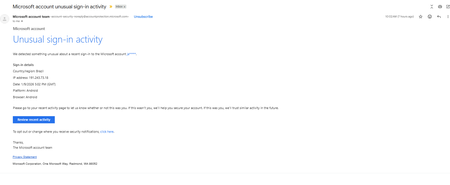
Unusual Sign-In Activity E-mail but I cannot identify the account!
Hi, I'm experiencing something quite weird. This morning I got an alert to a personal e-mail address of mine (w********@gmail.com) that a Microsoft account of mine was accessed from an IP address in Brazil. I've attached that e-mail and it lists the account as "ja*****" with no domain name listed. I have two microsoft accounts that I know of that start with "ja". One is a hotmail account and one is registered with my university account. I figured this alert had to do with my university account because that could explain why it never listed a domain name. However, when I checked, neither account have any record of a sign in, successful or unsuccessful, from an IP address in Brazil today. Furthermore, the university account doesn't have the w*******@gmail.com listed as a primary or secondary e-mail account so even if that was the account that alert wouldn't have gone to that e-mail. I contacted Microsoft support hoping that they could try to locate the alert e-mail and confirm what account the alert was about from their end but they told me they don't have the tools for that and they have limited access to their own system. A supervisor told me that at this point my best bet is to either post on the community forums or to go to the police and ask them to track the IP address. I have a vague memory that years ago when I tried to log into my university Microsoft account, it would let me log in as a personal account and as a work account separately but now I can only use it as a work account. I'm wondering if that might be related like maybe someone was able to access my personal account of my university Microsoft account which could explain both the lack of a domain name in the e-mail and the fact that there's no history of it in my work account. This is really bugging me because someone may have accessed an account belonging to me but I'm completely unable to actually confirm that or even the account this is happening to. Thanks!373Views1like3CommentsMicrosoft Ignite 2025: Top Security Innovations You Need to Know
🤖 Security & AI -The Big Story This Year 2025 marks a turning point for cybersecurity. Rapid adoption of AI across enterprises has unlocked innovation but introduced new risks. AI agents are now part of everyday workflows-automating tasks and interacting with sensitive data—creating new attack surfaces that traditional security models cannot fully address. Threat actors are leveraging AI to accelerate attacks, making speed and automation critical for defense. Organizations need solutions that deliver visibility, governance, and proactive risk management for both human and machine identities. Microsoft Ignite 2025 reflects this shift with announcements focused on securing AI at scale, extending Zero Trust principles to AI agents, and embedding intelligent automation into security operations. As a Senior Cybersecurity Solution Architect, I’ve curated the top security announcements from Microsoft Ignite 2025 to help you stay ahead of evolving threats and understand the latest innovations in enterprise security. Agent 365: Control Plane for AI Agents Agent 365 is a centralized platform that gives organizations full visibility, governance, and risk management over AI agents across Microsoft and third-party ecosystems. Why it matters: Unmanaged AI agents can introduce compliance gaps and security risks. Agent 365 ensures full lifecycle control. Key Features: Complete agent registry and discovery Access control and conditional policies Visualization of agent interactions and risk posture Built-in integration with Defender, Entra, and Purview Available via the Frontier Program Microsoft Agent 365: The control plane for AI agents Deep dive blog on Agent 365 Entra Agent ID: Zero Trust for AI Identities Microsoft Entra is the identity and access management suite (covering Azure AD, permissions, and secure access). Entra Agent ID extends Zero Trust identity principles to AI agents, ensuring they are governed like human identities. Why it matters: Unmanaged or over-privileged AI agents can create major security gaps. Agent ID enforces identity governance on AI agents and reduces automation risks. Key Features: Provides unique identities for AI agents Lifecycle governance and sponsorship for agents Conditional access policies applied to agent activity Integrated with open SDKs/APIs for third‑party platforms Microsoft Entra Agent ID Overview Entra Ignite 2025 announcements Public Preview details Security Copilot Expansion Security Copilot is Microsoft’s AI assistant for security teams, now expanded to automate threat hunting, phishing triage, identity risk remediation, and compliance tasks. Why it matters: Security teams face alert fatigue and resource constraints. Copilot accelerates response and reduces manual effort. Key Features: 12 new Microsoft-built agents across Defender, Entra, Intune, and Purview. 30+ partner-built agents available in the Microsoft Security Store. Automates threat hunting, phishing triage, identity risk remediation, and compliance tasks. Included for Microsoft 365 E5 customers at no extra cost. Security Copilot inclusion in Microsoft 365 E5 Security Copilot Ignite blog Security Dashboard for AI A unified dashboard for CISOs and risk leaders to monitor AI risks, aggregate signals from Microsoft security services, and assign tasks via Security Copilot - included at no extra cost. Why it matters: Provides a single pane of glass for AI risk management, improving visibility and decision-making. Key Features: Aggregates signals from Entra, Defender, and Purview Supports natural language queries for risk insights Enables task assignment via Security Copilot Ignite Session: Securing AI at Scale Microsoft Security Blog Microsoft Defender Innovations Microsoft Defender serves as Microsoft’s CNAPP solution, offering comprehensive, AI-driven threat protection that spans endpoints, email, cloud workloads, and SIEM/SOAR integrations. Why It Matters Modern attacks target multi-cloud environments and software supply chains. These innovations provide proactive defense, reduce breach risks before exploitation, and extend protection beyond Microsoft ecosystems-helping organizations secure endpoints, identities, and workloads at scale. Key Features: Predictive Shielding: Proactively hardens attack paths before adversaries pivot. Automatic Attack Disruption: Extended to AWS, Okta, and Proofpoint via Sentinel. Supply Chain Security: Defender for Cloud now integrates with GitHub Advanced Security. What’s new in Microsoft Defender at Ignite Defender for Cloud innovations Global Secure Access & AI Gateway Part of Microsoft Entra’s secure access portfolio, providing secure connectivity and inspection for web and AI traffic. Why it matters: Protects against lateral movement and AI-specific threats while maintaining secure connectivity. Key Features: TLS inspection, URL/file filtering AI Prompt Injection protection Private access for domain controllers to prevent lateral movement attacks. Learn about Secure Web and AI Gateway for agents Microsoft Entra: What’s new in secure access on the AI frontier Purview Enhancements Microsoft Purview is the data governance and compliance platform, ensuring sensitive data is classified, protected, and monitored. Why it matters: Ensures sensitive data remains protected and compliant in AI-driven environments. Key Features: AI Observability: Monitor agent activities and prevent sensitive data leakage. Compliance Guardrails: Communication compliance for AI interactions. Expanded DSPM: Data Security Posture Management for AI workloads. Announcing new Microsoft Purview capabilities to protect GenAI agents Intune Updates Microsoft Intune is a cloud-based endpoint device management solution that secures apps, devices, and data across platforms. It simplifies endpoint security management and accelerates response to device risks using AI. Why it matters: Endpoint security is critical as organizations manage diverse devices in hybrid environments. These updates reduce complexity, speed up remediation, and leverage AI-driven automation-helping security teams stay ahead of evolving threats. Key Features: Security Copilot agents automate policy reviews, device offboarding, and risk-based remediation. Enhanced remote management for Windows Recovery Environment (WinRE). Policy Configuration Agent in Intune lets IT admins create and validate policies with natural language What’s new in Microsoft Intune at Ignite Your guide to Intune at Ignite Closing Thoughts Microsoft Ignite 2025 signals the start of an AI-driven security era. From visibility and governance for AI agents to Zero Trust for machine identities, automation in security operations, and stronger compliance for AI workloads-these innovations empower organizations to anticipate threats, simplify governance, and accelerate secure AI adoption without compromising compliance or control. 📘 Full Coverage: Microsoft Ignite 2025 Book of News2.9KViews2likes0CommentsOnenote Files used in Malware attacks
Hi Folks, Any comments or recommendations regarding the increase of attacks via onenote files as noted in the below articles? I'm seeing a increased number of recommendations for blocking .one and .onepkg mail attachments. One issue is onepkg files currently cannot be added to the malware filter. https://www.securityweek.com/microsoft-onenote-abuse-for-malware-delivery-surges/ https://labs.withsecure.com/publications/detecting-onenote-abuse B JoshuaSolved51KViews1like3CommentsMicrosoft Security Store: Now Generally Available
When we launched the Microsoft Security Store in public preview on September 30, our goal was simple: make it easier for organizations to discover, purchase, and deploy trusted security solutions and AI agents that integrate seamlessly with Microsoft Security products. Today, Microsoft Security Store is generally available—with three major enhancements: Embedded where you work: Security Store is now built into Microsoft Defender, featuring SOC-focused agents, and into Microsoft Entra for Verified ID and External ID scenarios like fraud protection. By bringing these capabilities into familiar workflows, organizations can combine Microsoft and partner innovation to strengthen security operations and outcomes. Expanded catalog: Security Store now offers more than 100 third-party solutions, including advanced fraud prevention, forensic analysis, and threat intelligence agents. Security services available: Partners can now list and sell services such as managed detection and response and threat hunting directly through Security Store. Real-World Impact: What We Learned in Public Preview Thousands of customers explored Microsoft Security Store and tried a growing catalog of agents and SaaS solutions. While we are at the beginning of our journey, customer feedback shows these solutions are helping teams apply AI to improve security operations and reduce manual effort. Spairliners, a cloud-first aviation services joint venture between Air France and Lufthansa, strengthened identity and access controls by deploying Glueckkanja’s Privileged Admin Watchdog to enforce just-in-time access. “Using the Security Store felt easy, like adding an app in Entra. For a small team, being able to find and deploy security innovations in minutes is huge.” – Jonathan Mayer, Head of Innovation, Data and Quality GTD, a Chilean technology and telecommunications company, is testing a variety of agents from the Security Store: “As any security team, we’re always looking for ways to automate and simplify our operations. We are exploring and applying the world of agents more and more each day so having the Security Store is convenient—it’s easy to find and deploy agents. We’re excited about the possibilities for further automation and integrations into our workflows, like event-triggered agents, deeper Outlook integration, and more." – Jonathan Lopez Saez, Cybersecurity Architect Partners echoed the momentum they are seeing with the Security Store: “We’re excited by the early momentum with Security Store. We’ve already received multiple new leads since going live, including one in a new market for us, and we have multiple large deals we’re looking to drive through Security Store this quarter.” - Kim Brault, Head of Alliances, Delinea “Partnering with Microsoft through the Security Store has unlocked new ways to reach enterprise customers at scale. The store is pivotal as the industry shifts toward AI, enabling us to monetize agents without building our own billing infrastructure. With the new embedded experience, our solutions appear at the exact moment customers are looking to solve real problems. And by working with Microsoft’s vetting process, we help provide customers confidence to adopt AI agents” – Milan Patel, Co-founder and CEO, BlueVoyant “Agents and the Microsoft Security Store represent a major step forward in bringing AI into security operations. We’ve turned years of service experience into agentic automations, and it’s resonating with customers—we’ve been positively surprised by how quickly they’re adopting these solutions and embedding our automated agentic expertise into their workflows.” – Christian Kanja, Founder and CEO of glueckkanja New at GA: Embedded in Defender, Entra—Security Solutions right where you work Microsoft Security Store is now embedded in the Defender and Entra portals with partner solutions that extend your Microsoft Security products. By placing Security Store in front of security practitioners, it’s now easier than ever to use the best of partner and Microsoft capabilities in combination to drive stronger security outcomes. As Dorothy Li, Corporate Vice President of Security Copilot and Ecosystem put it, “Embedding the Security Store in our core security products is about giving customers access to innovative solutions that tap into the expertise of our partners. These solutions integrate with Microsoft Security products to complete end-to-end workflows, helping customers improve their security” Within the Microsoft Defender portal, SOC teams can now discover Copilot agents from both Microsoft and partners in the embedded Security Store, and run them all from a single, familiar interface. Let’s look at an example of how these agents might help in the day of the life of a SOC analyst. The day starts with Watchtower (BlueVoyant) confirming Sentinel connectors and Defender sensors are healthy, so investigations begin with full visibility. As alerts arrive, the Microsoft Defender Copilot Alert Triage Agent groups related signals, extracts key evidence, and proposes next steps; identity related cases are then validated with Login Investigator (adaQuest), which baselines recent sign-in behavior and device posture to cut false positives. To stay ahead of emerging campaigns, the analyst checks the Microsoft Threat Intelligence Briefing Agent for concise threat rundowns tied to relevant indicators, informing hunts and temporary hardening. When HR flags an offboarding, GuardianIQ (People Tech Group) correlates activity across Entra ID, email, and files to surface possible data exfiltration with evidence and risk scores. After containment, Automated Closing Comment Generator (Ascent Global Inc.) produces clear, consistent closure notes from Defender incident details, keeping documentation tight without hours of writing. Together, these Microsoft and partner agents maintain platform health, accelerate triage, sharpen identity decisions, add timely threat context, reduce insider risk blind spots, and standardize reporting—all inside the Defender portal. You can read more about the new agents available in the Defender portal in this blog. In addition, Security Store is now integrated into Microsoft Entra, focused on identity-centric solutions. Identity admins can discover and activate partner offerings for DDoS protection, intelligent bot defense, and government ID–based verification for account recovery —all within the Entra portal. With these capabilities, Microsoft Entra delivers a seamless, multi-layered defense that combines built-in identity protection with best-in-class partner technologies, making it easier than ever for enterprises to strengthen resilience against modern identity threats. Learn more here. Levent Besik, VP of Microsoft Entra, shared that “This sets a new benchmark for identity security and partner innovation at Microsoft. Attacks on digital identities can come from anywhere. True security comes from defense in depth, layering protection across the entire user journey so every interaction, from the first request to identity recovery, stays secure. This launch marks only the beginning; we will continue to introduce additional layers of protection to safeguard every aspect of the identity journey” New at GA: Services Added to a Growing Catalog of Agents and SaaS For the first time, partners can offer their security services directly through the Security Store. Customers can now find, buy, and activate managed detection and response, threat hunting, and other expert services—making it easier to augment internal teams and scale security operations. Every listing has a MXDR Verification that certifies they are providing next generation advanced threat detection and response services. You can browse all the services available at launch here, and read about some of our exciting partners below: Avanade is proud to be a launch partner for professional services in the Microsoft Security Store. As a leading global Microsoft Security Services provider, we’re excited to make our offerings easier to find and help clients strengthen cyber defenses faster through this streamlined platform - Jason Revill, Avanade Global Security Technology Lead ProServeIT partnering with Microsoft to have our offers in the Microsoft Security Store helps ProServeIT protect our joint customers and allows us to sell better with Microsoft sellers. It shows customers how our technology and services support each other to create a safe and secure platform - Eric Sugar, President Having Reply’s security services showcased in the Microsoft Security Store is a significant milestone for us. It amplifies our ability to reach customers at the exact point where they evaluate and activate Microsoft security solutions, ensuring our offerings are visible alongside Microsoft’s trusted technologies. Notable New Selections Since public preview, the Security Store catalog has grown significantly. Customers can now choose from over 100 third-party solutions, including 60+ SaaS offerings and 50+ Security Copilot agents, with new additions every week. Recent highlights include Cisco Duo and Rubrik: Cisco Duo IAM delivers comprehensive, AI-driven identity protection combining MFA, SSO, passwordless and unified directory management. Duo IAM seamlessly integrates across the Microsoft Security suite—enhancing Entra ID with risk-based authentication and unified access policy management across cloud and on-premises applications seamlessly in just a few clicks. Intune for device compliance and access enforcement. Sentinel for centralized security monitoring and threat detection through critical log ingestion about authentication events, administrator actions, and risk-based alerts, providing real-time visibility across the identity stack. Rubrik's data security platform delivers complete cyber resilience across enterprise, cloud, and SaaS alongside Microsoft. Through the Microsoft Sentinel integration, Rubrik’s data management capabilities are combined with Sentinel’s security analytics to accelerate issue resolution, enabling unified visibility and streamlined responses. Furthermore, Rubrik empowers organizations to reduce identity risk and ensure operational continuity with real-time protection, unified visibility and rapid recovery across Microsoft Active Directory and Entra ID infrastructure. The Road Ahead This is just the beginning. Microsoft Security Store will continue to make it even easier for customers to improve their security outcomes by tapping into the innovation and expertise of our growing partner ecosystem. The momentum we’re seeing is clear—customers are already gaining real efficiencies and stronger outcomes by adopting AI-powered agents. As we work together with partners, we’ll unlock even more automation, deeper integrations, and new capabilities that help security teams move faster and respond smarter. Explore the Security Store today to see what’s possible. For a more detailed walk-through of the capabilities, read our previous public preview Tech Community post If you’re a partner, now is the time to list your solutions and join us in shaping the future of security.1.2KViews3likes0CommentsGenAI vs Cyber Threats: Why GenAI Powered Unified SecOps Wins
Cybersecurity is evolving faster than ever. Attackers are leveraging automation and AI to scale their operations, so how can defenders keep up? The answer lies in Microsoft Unified Security Operations powered by Generative AI (GenAI). This opens the Cybersecurity Paradox: Attackers only need one successful attempt, but defenders must always be vigilant, otherwise the impact can be huge. Traditional Security Operation Centers (SOCs) are hampered by siloed tools and fragmented data, which slows response and creates vulnerabilities. On average, attackers gain unauthorized access to organizational data in 72 minutes, while traditional defense tools often take on average 258 days to identify and remediate. This is over eight months to detect and resolve breaches, a significant and unsustainable gap. Notably, Microsoft Unified Security Operations, including GenAI-powered capabilities, is also available and supported in Microsoft Government Community Cloud (GCC) and GCC High/DoD environments, ensuring that organizations with the highest compliance and security requirements can benefit from these advanced protections. The Case for Unified Security Operations Unified security operations in Microsoft Defender XDR consolidates SIEM, XDR, Exposure management, and Enterprise Security Posture into a single, integrated experience. This approach allows the following: Breaks down silos by centralizing telemetry across identities, endpoints, SaaS apps, and multi-cloud environments. Infuses AI natively into workflows, enabling faster detection, investigation, and response. Microsoft Sentinel exemplifies this shift with its Data Lake architecture (see my previous post on Microsoft Sentinel’s New Data Lake: Cut Costs & Boost Threat Detection), offering schema-on-read flexibility for petabyte-scale analytics without costly data rehydration. This means defenders can query massive datasets in real time, accelerating threat hunting and forensic analysis. GenAI: A Force Multiplier for Cyber Defense Generative AI transforms security operations from reactive to proactive. Here’s how: Threat Hunting & Incident Response GenAI enables predictive analytics and anomaly detection across hybrid identities, endpoints, and workloads. It doesn’t just find threats—it anticipates them. Behavioral Analytics with UEBA Advanced User and Entity Behavior Analytics (UEBA) powered by AI correlates signals from multi-cloud environments and identity providers like Okta, delivering actionable insights for insider risk and compromised accounts. [13 -Micros...s new UEBA | Word] Automation at Scale AI-driven playbooks streamline repetitive tasks, reducing manual workload and accelerating remediation. This frees analysts to focus on strategic threat hunting. Microsoft Innovations Driving This Shift For SOC teams and cybersecurity practitioners, these innovations mean you spend less time on manual investigations and more time leveraging actionable insights, ultimately boosting productivity and allowing you to focus on higher-value security work that matters most to your organization. Plus, by making threat detection and response faster and more accurate, you can reduce stress, minimize risk, and demonstrate greater value to your stakeholders. Sentinel Data Lake: Unlocks real-time analytics at scale, enabling AI-driven threat detection without rehydration costs. Microsoft Sentinel data lake overview UEBA Enhancements: Multi-cloud and identity integrations for unified risk visibility. Sentinel UEBA’s Superpower: Actionable Insights You Can Use! Now with Okta and Multi-Cloud Logs! Security Copilot & Agentic AI: Harnesses AI and global threat intelligence to automate detection, response, and compliance across the security stack, enabling teams to scale operations and strengthen Zero Trust defenses defenders. Security Copilot Agents: The New Era of AI, Driven Cyber Defense Sector-Specific Impact All sectors are different, but I would like to focus a bit on the public sector at this time. This sector and critical infrastructure organizations face unique challenges: talent shortages, operational complexity, and nation-state threats. GenAI-centric platforms help these sectors shift from reactive defense to predictive resilience, ensuring mission-critical systems remain secure. By leveraging advanced AI-driven analytics and automation, public sector organizations can streamline incident detection, accelerate response times, and proactively uncover hidden risks before they escalate. With unified platforms that bridge data silos and integrate identity, endpoint, and cloud telemetry, these entities gain a holistic security posture that supports compliance and operational continuity. Ultimately, embracing generative AI not only helps defend against sophisticated cyber adversaries but also empowers public sector teams to confidently protect the services and infrastructure their communities rely on every day. Call to Action Artificial intelligence is driving unified cybersecurity. Solutions like Microsoft Defender XDR and Sentinel now integrate into a single dashboard, consolidating alerts, incidents, and data from multiple sources. AI swiftly correlates information, prioritizes threats, and automates investigations, helping security teams respond quickly with less manual work. This shift enables organizations to proactively manage cyber risks and strengthen their resilience against evolving challenges. Picture a single pane of glass where all your XDRs and Defenders converge, AI instantly shifts through the noise, highlighting what matters most so teams can act with clarity and speed. That may include: Assess your SOC maturity and identify silos. Use the Security Operations Self-Assessment Tool to determine your SOC’s maturity level and provide actionable recommendations for improving processes and tooling. Also see Security Maturity Model from the Well-Architected Framework Explore Microsoft Sentinel, Defender XDR, and Security Copilot for AI-powered security. Explains progressive security maturity levels and strategies for strengthening your security posture. What is Microsoft Defender XDR? - Microsoft Defender XDR and What is Microsoft Security Copilot? Design Security in Solutions from Day One! Drive embedding security from the start of solution design through secure-by-default configurations and proactive operations, aligning with Zero Trust and MCRA principles to build resilient, compliant, and scalable systems. Design Security in Solutions from Day One! Innovate boldly, Deploy Safely, and Never Regret it! Upskill your teams on GenAI tools and responsible AI practices. Guidance for securing AI apps and data, aligned with Zero Trust principles Build a strong security posture for AI About the Author: Hello Jacques "Jack” here! I am a Microsoft Technical Trainer focused on helping organizations use advanced security and AI solutions. I create and deliver training programs that combine technical expertise with practical use, enabling teams to adopt innovations like Microsoft Sentinel, Defender XDR, and Security Copilot for stronger cyber resilience. #SkilledByMTT #MicrosoftLearn
Survey: Microsoft Purview Retention Labels in Outlook Mobile (iOS/Andriod)
We need your input! Today, in Outlook for Windows, Outlook for the Web, and (currently rolling out) Outlook for Mac, end-users can manually apply Microsoft Purview retention labels and MRM personal tags to individual emails and non-default (user-created) folders. The Outlook and Data Lifecycle Management product groups are interested in learning from our customers how important that same functionality would be in Outlook for Mobile (iOS/Android). Please consider filling out and sharing the following survey to let us know how this feature would or would not be useful to you and your organization: https://aka.ms/RetentionLabels-OutlookMobile Please note that your responses will remain anonymous unless you choose to provide contact information at the end of the survey.1.6KViews1like1Comment